|
Post Reply
David Ardley 2002-08-06 18:32
I am almost set up as I wish. However, I have a laptop and when I undock, I execute two hotkeys - one to change resolution, and one to disable the secondary monitor/
Would it be possible to have a feature that would allow both to run sequentially under a single hot key
|
Christian Studer 2002-08-06 22:35
That's possible, you can create a display profile that does both, then assign a hotkey to this profile.
Christian Studer - www.realtimesoft.com
|
David Ardley 2002-08-06 23:01
Sorry for not seeing this. If I create a dispay profile, I can only see the options to change the resolution - not disable monitor. Within the "options" hotkey panel, I cannot see how multiple selections can be added to a unique hotkey.
Can you provide a little more info.
|
Christian Studer 2002-08-06 23:09
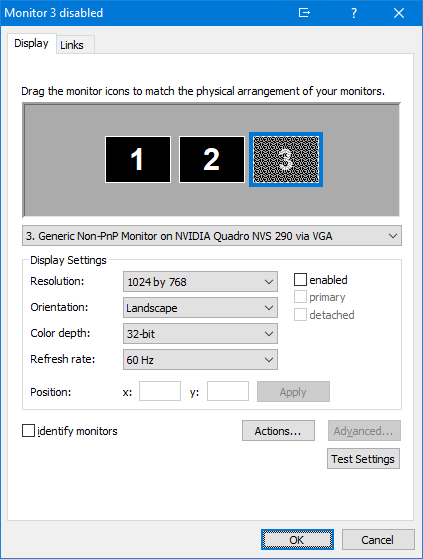
To disable/enable a monitor in a display profile, select the monitor and click the 'enabled' checkbox, which is to the right of the resolutions combo box. See this screenshot for an example.
Assigning two or more hotkey actions to a single hotkey isn't supported. If you need to do something that would require this, it would be necessary to write a custom script that executes all actions, and assign a single hotkey to this script.
Christian Studer - www.realtimesoft.com
|
Post Reply
|